
Claude Code and the Problem of Persistent Context
Recently, whilst testing in Claude Code, I started to think about the information I was exposing on a daily basis.
Where are my chats going? How much is being saved? If an attacker got hold of these files, what could they gain?
So I started digging into it, predictably using Claude itself to explain what was being stored and where.
Unlike Claude Desktop, Claude Code works from a specific project folder and has .claude folders that can customise things. This is brilliant from a hierarchy perspective and keeps projects individually organised with the Claude settings attached. For me though, I’m using it for pentesting, and I started thinking about the information I was potentially exposing on these systems.
What’s Actually Being Stored
The interesting bit is not just one file. Claude Code stores a fair amount of local application data under ~/.claude, or wherever CLAUDE_CONFIG_DIR points if that has been changed.
The full session transcripts appear under ~/.claude/projects/<project>/<session>.jsonl. These contain the conversation history, tool calls and tool results. There is also ~/.claude/history.jsonl, but that appears to be prompt history rather than the full transcript. It is still useful, but it is not the whole picture.
There are also other folders worth looking at, such as tool-results/ for larger tool outputs, file-history/ for pre-edit snapshots, paste-cache/ for large pasted content, and image-cache/ for attached images. So rather than hunting for one specific file, I think the better approach is just to treat the whole Claude config directory as interesting.
On the surface, this is expected behaviour. Claude Code needs local state for things like history, resume, rewind and restoring changes. The issue is that this data is plaintext on disk. If Claude reads an .env file through a tool, or a command prints a credential, that value can end up in the local transcript. So that env file that was read and then deleted may still be recoverable from Claude’s local state. That key that was edited because it looked sensitive may still be in there as well.
It’s likely a goldmine of information for an attacker with access to the box.
In a pretty standard post-exploitation scenario on a developer machine, this is one of the first places I’d check. You don’t need to dump memory or hook processes, you can just walk a predictable directory and pull back a structured log of what the assistant has seen, including sensitive data that only briefly passed through it.
Validating the Risk
To validate this, I generated some fake keys and ran TruffleHog over the whole Claude config directory rather than a single transcript path. It flagged them immediately, which makes the point pretty clearly: from an attacker’s perspective, this is a very efficient place to surface sensitive data.
trufflehog filesystem ~/.claude
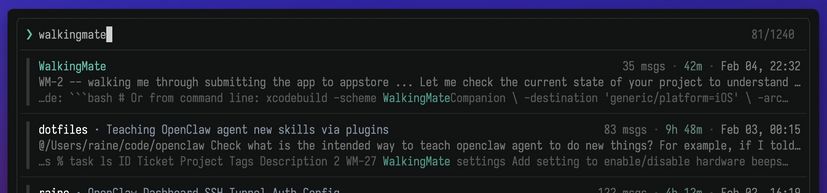
If it’s possible to use tools on the box, something like https://github.com/raine/claude-history can also be used to fuzzy search the transcript side of things. At that point you’re not really hunting anymore, you’re just querying a structured log of the developer’s workflow.
Defender Considerations
As a defender, it will be important to track these files as they may well be one of the first places checked by an attacker. They’re predictable, structured, plaintext, and likely to contain exactly the kind of data an attacker is looking for.
There are some useful mitigations here. Claude Code has a cleanupPeriodDays setting, which defaults to 30 days for a lot of the application data, although history.jsonl is kept until you delete it. There is also CLAUDE_CODE_SKIP_PROMPT_HISTORY, which can stop prompt history and transcripts being written to disk, but that comes with trade-offs around resume, continue and prompt recall.
It is also worth looking at permission rules. If there are files Claude should never be reading, such as .env files or secrets directories, blocking those paths is probably a better control than relying on people remembering not to expose them.
If your team are using honeypots, this may also be a good one to set up, perhaps whilst moving the legitimate one to an alternative location or on a box that does not use Claude Code.
Closing Thoughts
Overall this isn’t a novel attack, however I’m not sure everyone is aware of the level of local tracking that is happening and persisting on these boxes, or how useful that can be to an attacker. More often than not it’s the obvious stuff getting abused rather than some complex Mythos 0-day.